LeverSolo’s owner doesn’t write code. The site you’re reading was specified in plain language, built by AI coding assistants, and is hosted for $0 a month. Pages load as ready-made HTML, there’s no database, and there’s no admin login for bots to hammer.
Astro and Cloudflare are well documented, so this article spends most of its words on something less covered: how a non-developer keeps AI-written code from breaking the site. AI assistants make mistakes constantly, and some of them look perfectly fine until they reach a reader.
This is the stack, the guardrails, and two real mistakes the guardrails caught during the build.
The short answer
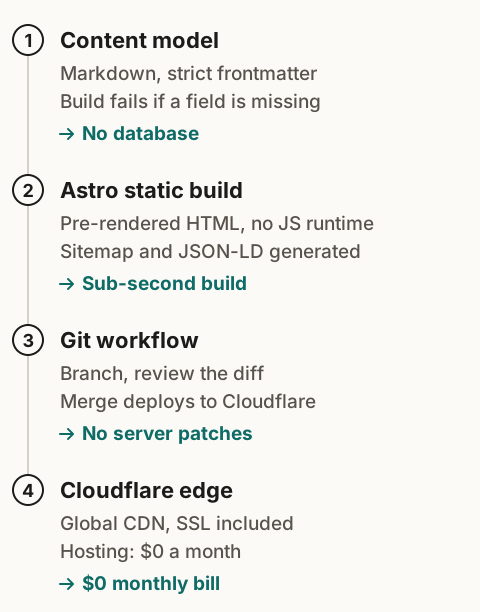
- Stack: Astro 7 turns Markdown into HTML at build time; Tailwind CSS 4 styles it; GitHub stores it; Cloudflare Pages builds and serves it.
- Cost: $0 hosting on Cloudflare Pages Free. The domain is the only fixed cost.
- The guardrails that make AI coding safe: a written spec, a strict content schema, the build as the referee, changes on a branch, and one AI tool editing at a time.
- Choose WordPress instead if you need a visual editor in the browser, several non-technical writers, or user accounts.
Static vs WordPress
| WordPress on typical hosting | Astro on Cloudflare Pages | |
|---|---|---|
| How a page is served | Built on each visit by PHP and a database query, unless a cache plugin steps in | Built once at deploy time, served as a ready-made file |
| Monthly hosting | A paid hosting plan | $0 on the Free plan |
| Maintenance | Core, theme, and plugin updates | Update dependencies when you choose to |
| Attack surface | Admin login, plugins, database | Static files only |
| Editing | Browser editor | Markdown files in a code editor |
The trade is real: you lose the browser editor. In return, there’s nothing on the server to patch, nothing to hack, and no bill.
The stack, piece by piece
- Astro 7 generates every page as plain HTML when you run
npm run build. Articles are Markdown files checked against a schema (more on that below). - Tailwind CSS 4 keeps styling next to the markup with one set of design tokens for colors, type, and spacing.
- @astrojs/sitemap writes the sitemap from the pages that actually exist, on every build.
- GitHub holds the code and every change ever made to it. Private repositories are free.
- Cloudflare Pages watches the repository. A push to the main branch triggers a build, and the new files go out on Cloudflare’s network.
From LeverSolo’s own build: 17 pages generate in about half a second on Node 24. No JavaScript framework ships to the browser; the only scripts are a 1.7 KB click-measurement file, a small one for the navigation menu, and an analytics consent bar. No web fonts download, because the site uses each device’s system font.
The guardrails
AI coding assistants are fast and confident, and they’re wrong often enough that you need a system that catches them without reading every line. These five do most of the work.
1. A spec before any code
Before the first line of code, a plain-language specification set the pages and URLs, the fields every article needs, the SEO rules, the tracking rules, and the brand rules. Every AI request points back to it. “Build the article page according to section 4 of the spec” produces far more predictable work than “make a blog page.”
A spec doesn’t need to be technical. Ours is written in the owner’s own language and reads like a list of decisions.
2. A content schema that refuses bad articles
Every article’s frontmatter is checked against a schema. Here’s a trimmed version of LeverSolo’s:
schema: z.object({
  title: z.string(),
  description: z.string(),
  pubDate: z.coerce.date(),
  pillar: z.enum(['ai-research-workflow', 'ai-content-seo', 'automation-workflows',
                  'ai-video-audio', 'ai-assisted-website-building']),
  // Required on purpose: a post must state its evidence level explicitly.
  testedType: z.enum(['hands-on', 'researched']),
})
Leave out a field, or misspell a pillar, and the build fails. An article can’t go live half-finished, and an article can’t quietly claim to be “hands-on” because someone forgot to say otherwise.
3. The build is the referee
Every change has to pass npm run build with no errors before it goes anywhere. You don’t need to understand the error to use it: if the build fails, the change isn’t done, and you paste the error back to the assistant.
4. A branch and a diff for every change
Changes happen on a separate Git branch. Before anything merges into main, the owner reads the list of changed files and a summary of each change. A request to “fix the footer” that touched twelve files is a red flag you can spot without reading code.
5. One writer at a time
Several AI tools can read the repository. Only one edits it at any moment, so two assistants never overwrite each other’s work.
Two mistakes the guardrails caught
Both happened while building LeverSolo.
An apostrophe that broke the build. An assistant edited a data file and wrote website's inside a string wrapped in single quotes. The quote ended the string early. The build stopped with Expected ',' or ']' but found 'Identifier', pointing at the exact file and line. The fix took seconds, and the broken version never reached the site.
An image that some renderers refused. One diagram used ↔ (an arrow) inside an SVG file. That entity is fine in HTML, but standalone SVG is XML, and XML doesn’t define it. When the diagram was converted to a PNG for social sharing, the converter rejected the file: Entity 'harr' not defined. Replacing it with the numeric code ↔ fixed it.
Both were caught by the build, before a reader ever saw them.
Deploying it
- Push the repository to GitHub.
- In Cloudflare, go to Workers & Pages → Create → Pages → Connect to Git, pick the repository, and set the build command to
npm run buildand the output directory todist. - Add your domain under Custom domains, then redirect
wwwto the bare domain with a Redirect Rule so there’s one canonical address. - Add a
public/_headersfile for security headers and caching. Ours also tells search engines not to index the temporary*.pages.devpreview addresses:
/_astro/*
  Cache-Control: public, max-age=31536000, immutable

https://:project.pages.dev/*
X-Robots-Tag: noindex- Submit
sitemap-index.xmlin Google Search Console and Bing Webmaster Tools.
A note on the platform: Cloudflare now recommends Workers Static Assets for new projects. Pages is still supported, free, and needs no config file for a site like this. The _headers file works on both, so moving later doesn’t mean rewriting the site.
What it costs
- Hosting: $0. The Cloudflare Pages Free plan allows 500 builds a month, one build at a time, and up to 20,000 files per site, with a 25 MiB limit per file. Its limits page lists no bandwidth cap (checked November 9, 2026). A site publishing a few times a week uses a small fraction of the build allowance.
- Domain: Cloudflare Registrar charges what the registry charges, with no markup on registration or renewal. That registry price is your one recurring bill.
- Code hosting: $0 on GitHub.
Where a static site runs out
Static HTML can’t do things that need a server at request time. Contact forms need a form service or a small serverless function. Comments need a third-party widget. Site search needs a client-side search index or an external service. User accounts and stores are a different kind of site. For a content and affiliate site, none of these are needed on day one.
Who should use this stack
It fits you if you’re fine writing Markdown (or letting an AI assistant handle files and Git), you care about page speed, and you want to own your code with no hosting lock-in.
Stick with WordPress if you or your writers need a visual editor in the browser, several non-technical people publish, or you need accounts, a members area, or a store.
Quick answers
Do I need to know how to code? No, but you need to know what each part is for, so you can tell when an assistant’s change doesn’t match your spec. The build and the branch review do the line-by-line checking.
Is Cloudflare Pages really free? The Free plan has limits on builds, files, and file size, but no listed bandwidth cap. A content site stays well inside them.
What if I outgrow it? Content lives in Markdown files you own. Moving to another static host means pointing it at the same repository.
More on building with AI tools in the AI-Assisted Website Building pillar. Once the site is live, Make vs n8n covers automating what happens after you publish.