You can now go from a published blog post to a rendered vertical video without touching an editor. An AI writes the script, a voice API reads it, a code template animates it, and a workflow tool drops the file in your upload queue. A year ago that took a developer. Today a solo builder can wire it up with Claude Code and a few free tools.
The cheapest video to make is also the easiest one for a platform to ignore, and YouTube has started refusing to pay for the worst of them. On July 15, 2025, YouTube renamed its “repetitious content” monetization rule to “inauthentic content” and said it would get better at spotting videos that are mass-produced or repetitive. It applies however the video was made, and YouTube’s documentation says monetization can be removed from the whole channel.
So the useful question is which parts of the job a machine can do, and which parts have to stay yours. This guide answers it at three levels of automation, with the real costs and limits of each.
The short answer
- Start manual. Make your first ten videos by hand on a 60-minute budget. You’re finding out which hook, length, and visual style your audience watches. A pipeline built before you know that just produces the wrong video faster.
- Then automate production. Script drafts, voice, captions, and rendering are mechanical. A pipeline does them better than you do at 11 p.m.
- Keep two jobs. Choosing what each video says, and approving it before it goes live. Those two decisions are what keep a channel out of “mass-produced” territory.
Three levels, side by side
| Level 1: Manual with templates | Level 2: Pipeline with a human gate | Level 3: Text-to-video apps | |
|---|---|---|---|
| How it works | You script, record, and edit from a saved template | Code and APIs produce a finished draft; you approve it | Paste a prompt or article, the app generates the whole video |
| Your time per video | About an hour | A few minutes of review | A few minutes |
| Setup effort | An afternoon | Real build work up front | Almost none |
| Visuals | Your real screen | Your real screens, data, and text, animated from a template | Mostly stock or AI-generated footage |
| Risk of looking mass-produced | Low | Low, if every video carries a new fact | Highest |
| Best for | Your first 10 to 20 videos | A proven format you publish several times a week | Testing a topic quickly, or channels where visuals don’t need to prove anything |
Level 3 is the one most “faceless channel” tutorials sell. It’s fast, and for a workflow or software audience it’s usually the weakest choice: stock clips can’t show the setting your viewer needs to change. Level 2 gives you the speed and keeps the proof.
Level 1: The 60-minute manual routine
Even if you plan to automate, do this first. It’s how you learn what the pipeline should build.
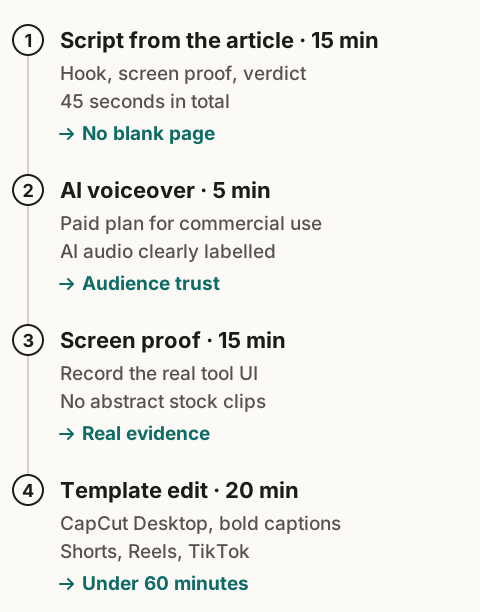
| Step | Time budget | Output |
|---|---|---|
| Pull a script from an article | 15 min | 45 seconds, about 110 to 120 words |
| Generate the voice | 5 min | One clean voice track |
| Record the screen | 15 min | Short clips of the tool doing the job |
| Edit from a template | 20 min | Captioned 9:16 video |
| Publish to three platforms | 5 min | One Short, one Reel, one TikTok |
These are targets. Log your real times for the first five videos, and fix whichever step keeps running over before you make more.
Every script follows one shape:
- Hook (0 to 3 seconds): the problem, said plainly. “Your automation bill doubles because of one setting.”
- Proof (4 to 35 seconds): the screen recording that shows the problem and the fix.
- Takeaway (36 to 45 seconds): one thing to remember, and where the full guide lives.
Three recording habits save most of the editing time: close every unrelated tab, zoom the browser to 125% or more so text reads on a phone, and record each step as its own short clip.
Level 2: The automated pipeline
Here’s the pipeline we’d build for a site like LeverSolo, where every video comes from an article that already exists. Each stage names the tool and the reason it’s there.
1. Trigger: a new article goes live
Your site’s RSS feed or your Git host’s publish webhook starts the run. Use the webhook if you can. In Make, a polling trigger can use a credit every time it checks, even when nothing is new.
2. Script: an LLM drafts it, inside a fence
Hand the model the full article and a strict output format. A loose “write a TikTok script” prompt gives you the same hype-voice script every other channel posts. A fenced one gives you something you can render:
You are writing a 45-second vertical video script from the article below.
Rules:
- Use only facts that appear in the article. No new numbers.
- Return JSON: {"hook": "...", "beats": ["...", "...", "..."], "takeaway": "...", "visual_for_each_beat": ["..."]}
- Hook: one sentence, under 12 words, states a problem the viewer has.
- Beats: three steps or facts, each under 25 words, each tied to one visual.
- Takeaway: one sentence, then "Full guide on LeverSolo."
- Total spoken words: 110 to 120.
Article:
{{article_markdown}}
The visual_for_each_beat field matters most. It forces every sentence to point at something the viewer will see: a screenshot, a table row, a number.
3. Voice and captions in one API call
ElevenLabs has a text-to-speech endpoint that returns the audio plus the start and end time of every character in the script. Those timings are your captions. You skip a separate transcription step, and the words on screen match the voice exactly.
At about 700 characters per 45-second script, and one credit per character on ElevenLabs’ multilingual models, the Starter plan’s 30,000 monthly credits cover roughly 40 voice tracks. Plan on 20 to 25 finished videos to leave room for retakes. Credits are shared across ElevenLabs’ products, so the API draws from the same pool.
4. Visuals: real screens, animated by code
This is the stage that separates Level 2 from slop. Instead of stock footage, the pipeline uses:
- screenshots of the real tool or page, captured automatically with a headless browser (Playwright is the common choice)
- tables and numbers from the article, turned into animated bars and callouts
- the hook and takeaway as large on-screen text
Remotion is the tool that makes this practical. You build the video as a React component, so one template renders a fresh video from new data every time. Remotion is free for individuals and small companies; bigger companies pay for a license.
You don’t have to write that React code yourself. Remotion publishes official agent skills that teach Claude Code (and Cursor, Codex, and others) how to work in a Remotion project:
npx skills add remotion-dev/skillsThen describe the template in plain language:
/remotion-create a 1080x1920 composition called ArticleShort.
Props: hook (string), beats (array of {text, imagePath}), takeaway (string),
audioPath, and captions (array of {word, start, end}).
Layout: hook as large text for the first 3 seconds, then each beat shows its
image full-width with the beat text on top, then the takeaway.
Captions: two lines max, high contrast, synced to the captions prop.
Add a Studio preview with sample props so I can check it before rendering.
Preview it in Remotion Studio, adjust until one video looks right, and every later video inherits the fixes.
5. Render
Remotion renders the MP4 from the command line, on your own machine or a small server, so a render costs you nothing beyond the hardware you already have.
6. The review gate
Send the finished file, the script, and the caption text to one place you check daily: a Notion table, a Google Drive folder, a Slack channel. Approving should take one tap. This is the step that keeps your judgment in the loop, and you can still publish every day without spending your day on it.
7. Publish, within each platform’s rules
| Platform | What the API allows | Watch out for |
|---|---|---|
| YouTube | Upload through the YouTube Data API | A default project gets 100 upload requests a day, counted separately from its other quota |
| Instagram Reels | Publish Reels to professional accounts | Meta’s docs cap API-published posts per 24 hours; the page quotes both 50 and 100, so check the limit endpoint for your account |
| TikTok | Content Posting API | Until your app passes TikTok’s audit, every post it makes is private. Plan to upload to TikTok by hand at first |
(Limits from each platform’s developer documentation, checked November 9, 2026.)
8. Glue it together
n8n or Make runs the sequence: webhook in, LLM call, voice call, screenshot job, render command, review message, upload. If you self-host n8n, the render can run on the same server. Make vs n8n covers which fits your volume, and why n8n’s per-run pricing suits a long, multi-step pipeline like this one.
How to stay out of “mass-produced” territory
YouTube says the inauthentic content rule targets videos that are mass-produced or repetitive, and that it applies regardless of how a video was made. Coverage of the update reported that adding meaningful original commentary, editing, or educational value keeps content eligible. A pipeline can meet that bar if you design it to:
- Every video carries one fact the viewer didn’t have. A price, a limit, a setting, a step. If the script could have been written without the article, don’t publish it.
- Vary the hook and the first visual. The same opening frame on every video is the first thing that makes a channel look automated.
- Cap your volume at what you can review. Five approved videos a week beats fifty unreviewed ones.
- Reply to comments yourself. It’s the cheapest signal that a person runs the channel.
On disclosure: YouTube requires creators to disclose realistic AI-generated or altered content, such as making a real person appear to say something they didn’t. Its help page lists script and outline help, caption creation, and cloning your own voice for voice-overs as examples that don’t need disclosure. An AI narrator over your own screenshots is close to those examples; if a video ever shows a realistic person or place that was generated, tick the “AI use” box when you upload. TikTok has its own labeling rules for AI-generated content, so check them before your first upload there.
What it costs
| Setup | Monthly cost | Notes |
|---|---|---|
| Level 1, testing the format | $0 | ElevenLabs Free has no commercial license listed; use it only while testing |
| Level 1, publishing regularly | $5 to $6 | ElevenLabs Starter for the commercial license |
| Level 2 pipeline | ElevenLabs plan + your n8n or Make cost + LLM usage | Remotion and Playwright are free for a solo builder; rendering runs on your own machine |
ElevenLabs prices from its pricing page, checked November 9, 2026.
Who should automate, and when
Automate now if you already publish written workflows several times a week, you’ve made at least ten videos by hand, and you know which format holds viewers.
Stay manual if you haven’t found your format yet, or your topic happens off-screen (cooking, physical products, anything a viewer needs to see you handle).
Skip Level 3 apps if your audience comes to you for proof. Generated footage can’t show the real setting, error message, or result, and that’s the whole reason a workflow audience watches.
Quick answers
Can short-form video be fully automated? Technically, yes: script, voice, visuals, render, and upload can all run without you. We don’t recommend skipping the review step, because of YouTube’s inauthentic content rule and TikTok’s private-only limit for unaudited apps.
Do I need to know how to code to use Remotion? It helps, but Remotion’s official agent skills let Claude Code write and fix the template from plain-language instructions. You need to be able to run commands in a terminal and judge whether the preview looks right.
Is an AI voice allowed on monetized YouTube channels? AI voices aren’t banned. What YouTube restricts is mass-produced or repetitive content, whatever tools made it.
The scripts in this pipeline come from articles, so the articles come first: see the AI content system for solo sites. More video and audio workflows live in the AI Video & Audio Production pillar.