Ask any chatbot to “write a 1,500-word article about Make vs n8n” and you’ll get one in under a minute. It will be fluent, well structured, and almost identical to the one your competitor got by typing the same sentence.
That’s the problem with AI content for a small site. The draft is free for everyone, so the draft itself is worth nothing in search. What still earns a ranking, and now a citation in AI answers, is whatever your page has that the other pages don’t: a price you checked this week, a worked example, a clear call on which option to pick.
This guide is the system LeverSolo uses to produce that kind of article with AI doing most of the legwork. It includes the templates: a brief, a critic prompt, a pre-publish checklist, and a monthly refresh routine.
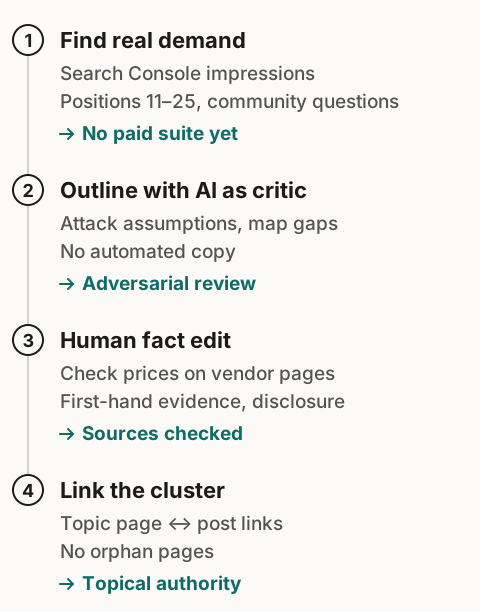
The short answer
- Pick topics from questions real people ask, not from a chatbot’s idea list.
- Decide what your article adds before you write a word of it.
- Collect sources first, then let AI work only on those sources.
- Use AI to attack your outline, not to write your article.
- Edit every line against a checklist.
- Link it into a cluster, then revisit it monthly with Search Console data.
What Google actually says about AI content
Google doesn’t penalize content for being AI-assisted. Its Search Central guidance says it rewards helpful, reliable content however it’s produced. What breaks its spam policies is generating pages at scale mainly to manipulate rankings, with little value for readers.
So the test for every article is concrete: would a reader who has already read the top three results learn something new here? If the honest answer is no, the article isn’t ready, however well it reads.
Step 1: Decide what your article adds
Before outlining, write one line that answers: “After reading this, the reader will know ___ that the current top results don’t tell them.”
There are five reliable ways to fill that blank:
| What you add | Example |
|---|---|
| A number you checked | Today’s plan prices from the vendor’s own page, dated |
| A worked example | The credit math for one specific workflow, step by step |
| A decision rule | “If runs × steps fits inside a Make tier, stay on Make” |
| A step you actually did | Screenshots and settings from your own setup |
| A correction | A claim that’s widely repeated and wrong, with the source that shows it |
If you can’t fill the blank, pick a different topic or a narrower angle. This one line does more for rankings than any keyword tool.
Step 2: Pick topics from real questions
Before your site has traffic, look where readers already ask:
- the “People also ask” box for your core topics
- forum and community threads where people describe a problem in their own words
- gaps in the pages that rank: the step they skip, the question they dodge
Once you’re live, Search Console becomes your best idea source. In the Performance report, filter to queries where your average position is roughly 8 to 20. Those are pages Google already half-trusts for that topic. A focused new section, or a dedicated article linked from the existing one, often moves them up.
Step 3: Write a brief before you prompt anything
A brief stops the AI (and you) from drifting into the generic version of the article. Ours fits on one screen:
ARTICLE BRIEF
Working title:
Reader: (who, what stage, what they've already tried)
Search intent: (what they typed, what they want to do next)
What this adds: (the one line from Step 1)
Sources: (vendor pages with dates, docs, your own screenshots or numbers)
Decision we'll recommend: (the call the article makes)
Who should NOT follow it: (be specific)
Internal links: (pillar page + 2 related guides)
Then gather the sources it lists. A model answering from memory mixes up years: old prices, retired plans, programs that closed. Collect the facts first, so the AI works on your material instead of filling gaps from memory.
Step 4: Use AI as a critic
The most useful thing AI can do for an outline is attack it. Paste the brief, the outline, and the sources, then ask:
Here is my brief, my outline, and the sources I'm working from.
1. What would a skeptical reader push back on?
2. Where does this workflow break in real use? List edge cases.
3. What questions does the reader still have after the last section?
4. Which of my claims are not supported by the sources? Quote the claim.
Answer only from the sources. Mark anything else as UNVERIFIED.
You end up with an outline built around real friction, plus a list of claims to cut or source.
AI is also good at a few narrow drafting jobs: turning your messy notes into a first pass of one section, summarizing a long doc you’ve already read, or suggesting five alternative headlines. Use it for those. Keep the decisions for yourself.
Step 5: Edit every line
Here’s what a typical AI first draft looks like next to an edited version of the same paragraph (an illustration, not a quote from any real site):
AI draft: “In today’s fast-paced digital landscape, choosing the right automation platform is crucial for solo entrepreneurs. Both Make and n8n offer powerful features that can streamline your workflows and boost productivity.”
Edited: “Make charges per action and n8n charges per run, so the cheaper tool depends on one number: runs per month times steps per run. Here’s how to work it out for your own workflows.”
The edit cut every word that would fit any article on any tool and replaced them with the one fact that decides the reader’s choice.
Run every article through this checklist before it goes live:
- The “what this adds” line from the brief is delivered, and visible in the first screen of text
- Every price, limit, and statistic links to its source and shows the date you checked
- The article makes a recommendation, and says who it’s wrong for
- Each section opens with its answer in the first two or three sentences
- Comparisons are tables; processes are numbered steps
- Stock phrases are gone (“in today’s world”, “it’s important to note”, “unlock”, “seamless”)
- Hands-on or researched is labelled honestly
- The title promises what the article delivers, in under about 60 characters
- It links to its pillar page and at least two related guides
- You’d send it to a friend who asked this exact question
Step 6: Write so AI answers can cite you
A growing share of searches end without a click. Ahrefs found that when an AI Overview appeared, the click-through rate for the top-ranking page fell by about 58% (December 2025 data). You can’t stop that, but you can be the source the answer quotes.
Google says AI Overviews run on its normal ranking systems and need no special markup. What helps across Google, ChatGPT, and Perplexity is the same structure that helps a hurried human reader: a direct answer at the top of each section, tables for comparisons, numbered steps for processes, and dates on facts that change. The checklist above already covers it. Write one page for people; a separate “AI version” is exactly the kind of scaled content Google’s spam policies describe.
Step 7: Build clusters, then refresh monthly
A lone article on a new site rarely ranks. Each one sits in a cluster:
- it links up to its pillar page (here, AI for Content & SEO)
- it links across to related guides, like how to validate a micro-niche
- the pillar links down to every article in it
Then, once a month, spend half an hour in Search Console:
- Positions 8 to 20: which queries are close? Add a section that answers them directly.
- High impressions, low click-through: the title or description isn’t earning the click. Rewrite it around what the article adds.
- Prices and plans: re-check every number in articles that mention a paid tool. If something changed, update it and change the “Updated” date. Only change the date when the content actually changed.
What to spend at each stage
| Stage | Tools | Monthly cost | What to watch |
|---|---|---|---|
| Pre-revenue | Search Console, Bing Webmaster Tools, Google Trends, a free AI tier | $0 | Pages indexed, first impressions |
| First revenue | Add one paid AI assistant you use daily | One subscription | Click-through rate, affiliate clicks per article |
| Steady revenue | Add a keyword and backlink suite | Semrush starts at $139.95/month billed monthly (its “SEO” plan, checked November 9, 2026) | Competitor gaps, links |
A paid SEO suite costs more than most new sites earn in their first months. Until revenue covers it, Search Console data and hand-checked results pages are enough to decide what to write next.
Who this system is for
It fits you if you’re building a site to earn search traffic for years, and you’re willing to spend real time checking sources and editing.
It doesn’t fit you if you want fully automated publishing. Pages that add nothing to what’s already ranking are what search engines filter out, and automating them only makes more of them.
Quick answers
Will Google penalize AI-written content? Not for being AI-assisted. Google’s guidance targets content made mainly to manipulate rankings, whatever made it. A helpful article that used AI for research and drafting is fine.
Do I need an SEO tool to start? No. Search Console and Bing Webmaster Tools are free and show your real queries once you’re live. Before launch, the results pages themselves are your keyword research.
How long should an article be? As long as it takes to deliver what it adds, and no longer. Cut any section a reader could skip without missing anything.
See the system’s first step in depth in how to validate a micro-niche with AI research. Turning articles into video next? The short-form video guide shows how to automate it without the slop.